rockverse.viz.OrthogonalViewer#
- class rockverse.viz.OrthogonalViewer(image, *, region=None, mask=None, segmentation=None, histogram_bins=None, ref_voxel=None, ref_point=None, show_xy_plane=True, show_xz_plane=True, show_zy_plane=True, show_histogram=True, show_guide_lines=True, hide_axis=False, image_dict=None, segmentation_alpha=None, segmentation_colors=None, mask_color=None, mask_alpha=None, guide_line_dict=None, histogram_line_dict=None, figure_dict=None, gridspec_dict=None, template='X-ray CT', statusbar_mode='coordinate', layout='2x2')[source]#
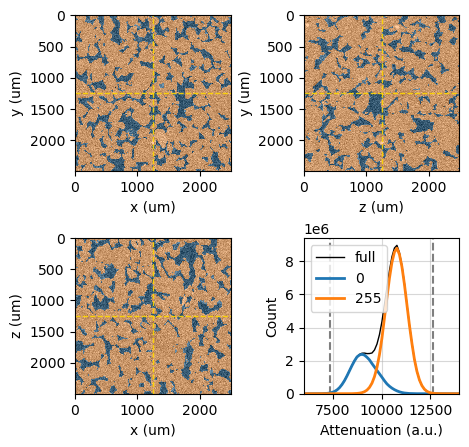
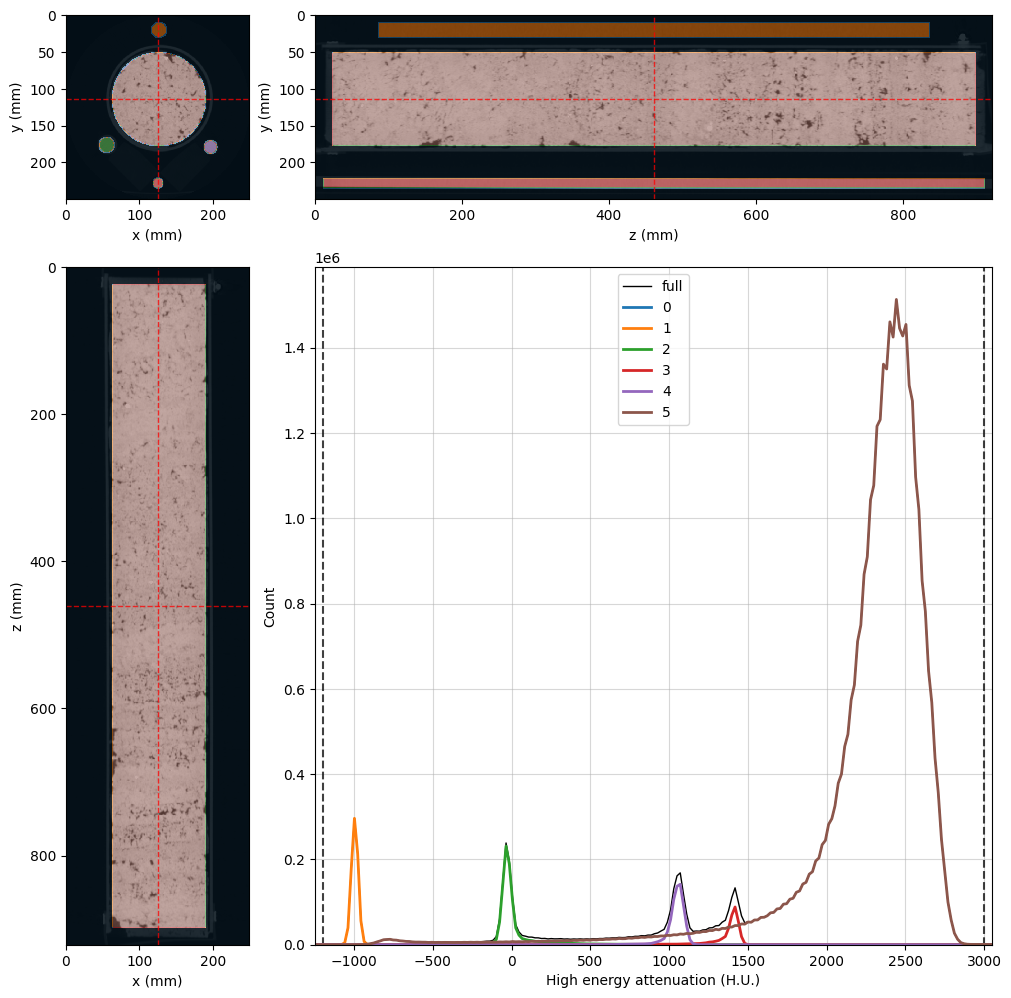
Visualize orthogonal slices (XY, XZ, ZY planes) of a voxel image and its histogram. Supports overlays for masks, segmentations, and region-based filtering.
- Parameters:
image (VoxelImage) – The image object to be visualized.
region (Region, optional) – Region object to mask specific voxels on slices and histogram.
mask (VoxelImage, optional) – Boolean voxel image for masking specific voxels on slices and histogram.
segmentation (VoxelImage, optional) – Unsigned int voxel image with segmentation phases to overlay labeled regions on slices and histogram.
histogram_bins (int or sequence of scalars, optional) – Binning definition for histogram calculation.
ref_voxel (tuple of int, optional) – Reference voxel (i, j, k) coordinates for slice positioning. Default is the center voxel.
ref_point (tuple of float, optional) – Physical coordinates (x, y, z) in voxel length units, for slice positioning. Overrides ref_voxel.
show_xy_plane (bool, optional) – Display the XY plane slice. Default is True.
show_xz_plane (bool, optional) – Display the XZ plane slice. Default is True.
show_zy_plane (bool, optional) – Display the ZY plane slice. Default is True.
show_histogram (bool, optional) – Display histogram alongside slices. Default is True.
show_guide_lines (bool, optional) – Show guide lines marking slice intersections. Default is True.
hide_axis (bool, optional) – Hide axis labels and ticks in the slice plots. Default is False.
image_dict (dict, optional) – Matplotlib’s
AxisImagecustom options for image rendering.segmentation_alpha (float, optional) – Tranparency level for segmentation overlay.
segmentation_colors (str or list, optional) – A string representing a predefined colormap or a list of colors. If a string, it should be the name of a Matplotlib qualitative colormap (e.g., ‘Set1’, ‘Pastel1’, ‘Pastel1_r’). If a list, it should contain colors in a format acceptable by Matplotlib (e.g., RGB tuples, hex codes). The colors will be cycled through and assigned to the segmentation phases.
mask_color (Any, optional) – Color for mask overlay. Any color format accepted by Matplotlib.
mask_alpha (float, optional) – Tranparency level for mask overlay. It must be a float between 0.0 and 1.0.
guide_line_dict (dict, optional) – Matplotlib’s
Line2Dcustom options for guide lines (e.g., linestyle, color, linewidth).histogram_line_dict (dict, optional) –
Custom options for Matplotlib’s
Line2Din the histogram plot.This dictionary must include the following structure:
{
    'full': <**kwargs>,   # For the full histogram
    'phases': <**kwargs>, # For segmentation phases
    'clim': <**kwargs>    # For the vertical CLIM lines
}
Example:
histogram_line_dict = {
    'full': {'color': 'blue', 'linewidth': 2},
    'phases': {'linestyle': '--', 'alpha': 0.7},
    'clim': {'color': 'red', 'linewidth': 1}
}
figure_dict (dict, optional) – A Dictionary of keyword arguments to be passed to the underlying Matplotlib figure creation.
gridspec_dict (dict, optional) – Dictionary of keyword arguments for customizing the grid layout of the figure, generated using Matplotlib gridspec. Width and height ratios are automatically calculated from image dimensions.
template ({'X-ray CT', 'Scalar field'}, optional) –
The template to use for visualizing the orthogonal slices. This parameter determines the default settings for the viewer, including colormaps, alpha values, and other rendering options. Note that values from templates have lower precedence than other customization parameters.
Available templates:
’X-ray CT’: the default value, optimized for X-ray computed tomography images, with settings suitable for visualizing attenuation values.
’Scalar field’: optimized for scalar fields such as electric potentials or velocity components.
statusbar_mode ({'coordinate', 'index'}) –
The desired status bar information mode when hovering the mouse over the figure in interactive mode:
’coordinate’ for physical coordinates.
’index’ for voxel indices.
layout ({'2x2', 'vertical', 'horizontal'}, optional) –
The layout configuration for displaying the orthogonal slices and histogram.
This parameter determines how the various components (XY, XZ, ZY slices, and histogram) are arranged within the figure. The following layout options are available:
’2x2’: Arranges the XY and ZY slices in the top row and the XZ slice and histogram in the bottom row, creating a 2x2 grid layout.
’vertical’: Stacks the XY, ZY, XZ, and XZ slices vertically in a single column, and places the histogram below them.
’horizontal’: Places the XY slice on the left, followed by the ZY slice, the XZ slice, and the histogram plot.
The default layout is ‘2x2’. This parameter allows for flexible visualization of the slices and histogram based on user preferences or specific analysis needs.
- Returns:
The OrthogonalViewer instance.
- Return type:
RockVerse objects#
The input image data. |
|
Get or set the region of interest. |
|
Get or set the mask image. |
|
Get or set the segmentation image. |
|
The |
Axes building attributes#
Boolean flag to enable or disable the visibility of the XY slice. |
|
Boolean flag to enable or disable the visibility of the XZ slice. |
|
Boolean flag to enable or disable the visibility of the ZY slice. |
|
Boolean flag to enable or disable the visibility of the histogram plot. |
|
Dictionary of keyword arguments for customizing the figure's grid layout. |
|
|
Update the gridspec settings dictionary and rebuilds the display. |
Get or set the figure grid layout. |
View customization attributes and methods#
Get or set the plot reference point in voxel position. |
|
Get or set the plot reference point in voxel units. |
|
Get the dictionary of keyword arguments for customizing the image display. |
|
|
Update the image display settings dictionary and refreshes the display. |
Boolean flag to enable or disable the visibility of the guide lines for slice intersection. |
|
Get the dictionary of Matplotlib's |
|
|
Update the guide line display settings dictionary and refresh the display. |
Get or set the color list for the segmentation phases. |
|
Get the segmentation colorlist as a Matplotlib colormap. |
|
Get or set the transparency level for segmentation overlay. |
|
Get or set the color for the mask overlay. |
|
Get or set the transparency level for the mask overlay. |
|
Get or set the histogram bins. |
|
Get the dictionary of keyword arguments for customizing the histogram lines. |
|
Update the histogram lines display settings dictionary and refreshes the display. |
|
A dictionary with the Matplotlib |
|
Boolean flag to control the visibility of image axes and labels. |
|
Adjust the figure size to fit the ideal proportions of the content. |
|
Adjust the figure size to ensure that all content fits within the figure. |
|
Get or set the status bar display mode. |
Interactive Features#
The OrthogonalViewer class offers interactive features that enhance the user
experience by allowing real-time updates and interactions with the visualized
data, including the displayed slices and histograms.
Note
To utilize the interactive features, ensure that Matplotlib is configured for interactive mode. You can use backends such as Qt5Agg or ipympl for Jupyter Notebooks.
Users can interact with the visualization through mouse actions on the image slices or the histogram. The following actions are supported:
Left click on image slices |
Displays voxel data at the cursor position in the console. |
Right click on image slices |
Updates the reference point to the cursor position, allowing users to change the displayed slices. |
Middle click on image slices |
Resets the reference point to the center of the image bounding box. |
Left click on histogram |
Sets the image minimum color limit (clim) value to the horizontal coordinate of the click. |
Right click on histogram |
Sets the image maximum color limit (clim) value to the horizontal coordinate of the click. |
Middle click on histogram |
Resets the image color limit (clim) values to the 99.9% confidence interval based on the histogram data. |