Belgian Fieldstone Sample#
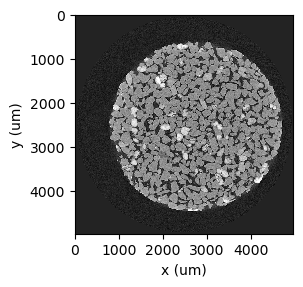
This sample is a micro-CT scan of a 4 mm diameter glauconite-rich sandstone sample, by Tom Bultreys and Wesley De Boever, acquired with 4.98 micrometer voxel length at Ghent University’s Centre for X-ray Tomography and hosted at Digital Rocks Portal.
Note
If you plan to use this data, please remember to cite the data and the related publications.
Go to the Belgian Fieldstone project in the Digital Rocks Portal: https://www.digitalrocksportal.org/projects/297. Click on Micro-CT scan.
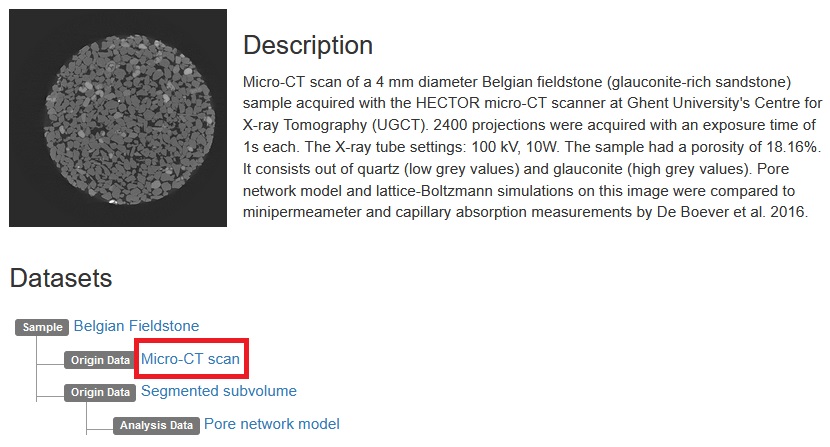
Pay attention to the metadata! We’ll need it later. An extra piece of information: this raw data is in Fortran file order. Click Action->Download File.
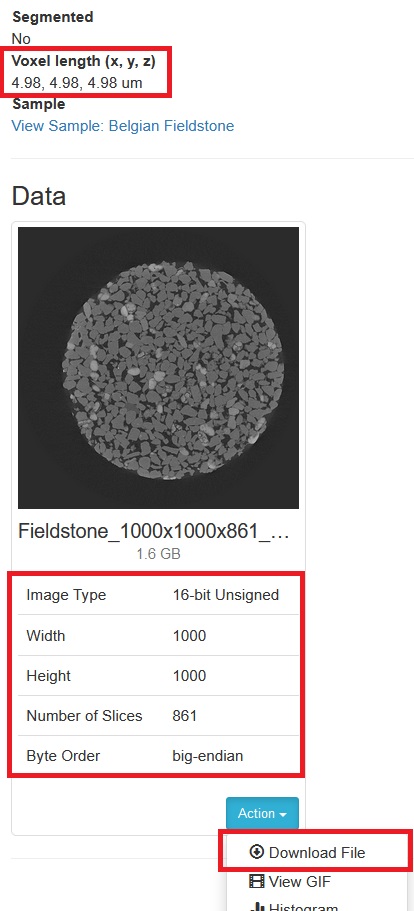
Let’s import the raw file into a RockVerse voxel image. In this example we’ll use 8 chunks, halving the total number of voxels in each direction:
[1]:
import rockverse as rv

belgian_fieldstone_data = rv.voxel_image.import_raw(
    rawfile='/path/to/rawdata/BelgianFieldstone/Fieldstone_1000x1000x861_16b.raw',
    store='/path/to/imported/BelgianFieldstone/original',  #<- path to the imported the voxel image
    shape=(1000, 1000, 861),         #<- From metadata, image size
    dtype='>u2',                     #<- From metadata, big-endian 16-bit unsigned integer
    offset=0,                        #<- From metadata
    voxel_length=(4.98, 4.98, 4.98), #<- From metadata
    voxel_unit='um',                 #<- From metadata, micrometer
    raw_file_order='F',              #<- Fortran file order
    chunks=(500, 500, 431),          #<- Our choice of chunk size will give a 2x2x2 chunk grid
    field_name='Attenuation',        #<- Our choice for field name (X-ray attenuation)
    field_unit='a.u.',               #<- Our choice for field units (arbitrary units)
    description='Belgian Fieldstone original X-ray CT',
    overwrite=True                   #<- Overwrite if file exists in disk
    )
[2025-01-09 12:29:43] (Attenuation) Importing raw file: 100%|>>>>>>>>>>| 8/8 [00:21<00:00, 2.75s/chunk]
The image now is available as a RockVerse voxel image in disk, at the path given in the store parameter. Remember: RockVerse voxel images are modified Zarr arrays, so you can use all the original properties and methods. Let’s take a look at the general structure:
[2]:
belgian_fieldstone_data.info
[2]:
| Type | rockverse.voxel_image.VoxelImage |
|---|---|
| Data type | uint16 |
| Shape | (1000, 1000, 861) |
| Chunk shape | (500, 500, 431) |
| Order | C |
| Read-only | False |
| Compressor | Blosc(cname='lz4', clevel=5, shuffle=SHUFFLE, blocksize=0) |
| Store type | zarr.storage.DirectoryStore |
| No. bytes | 1722000000 (1.6G) |
| No. bytes stored | 1323693972 (1.2G) |
| Storage ratio | 1.3 |
| Chunks initialized | 8/8 |
Notice the chunk order was changed to C for cache optimization. Digital rock metadata are stored as zarr attributes:
[3]:
for k,v in belgian_fieldstone_data.attrs.items():
    print(f"{k}: {v}")
_ROCKVERSE_DATATYPE: VoxelImage
description: Belgian Fieldstone original X-ray CT
field_name: Attenuation
field_unit: a.u.
voxel_length: [4.98, 4.98, 4.98]
voxel_origin: [0, 0, 0]
voxel_unit: um
But you can access them directly through the corresponding VoxelImage properties (check the API documentation for more details):
[4]:
print(f'''
Field name: {belgian_fieldstone_data.field_name},
Field unit: {belgian_fieldstone_data.field_unit},
Image size: {belgian_fieldstone_data.shape}
dtype: {belgian_fieldstone_data.dtype},
Voxel length: {belgian_fieldstone_data.voxel_length} {belgian_fieldstone_data.voxel_unit},
Image size per dimension: ({belgian_fieldstone_data.nx}, {belgian_fieldstone_data.ny}, {belgian_fieldstone_data.nz})
Voxel length per dimension: ({belgian_fieldstone_data.hx}, {belgian_fieldstone_data.hy}, {belgian_fieldstone_data.hz}) {belgian_fieldstone_data.h_unit}
''')
Field name: Attenuation,
Field unit: a.u.,
Image size: (1000, 1000, 861)
dtype: uint16,
Voxel length: (4.98, 4.98, 4.98) um,
Image size per dimension: (1000, 1000, 861)
Voxel length per dimension: (4.98, 4.98, 4.98) um
[5]:
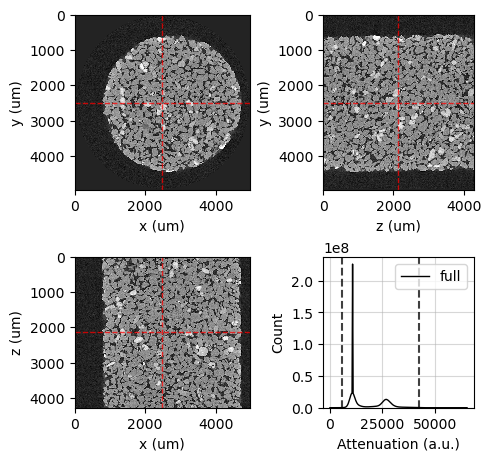
viewer = rv.OrthogonalViewer(belgian_fieldstone_data)
[2025-01-09 12:30:05] Histogram Attenuation (min/max): 100%|>>>>>>>>>>| 8/8 [00:02<00:00,  3.93chunk/s]
[2025-01-09 12:30:07] Histogram Attenuation (counting voxels): 100%|>>>>>>>>>>| 8/8 [00:23<00:00,  2.90s/chunk]
[6]:
viewer.show_guide_lines = False
viewer.show_histogram = False
viewer.show_zy_plane = False
viewer.show_xz_plane = False
viewer.figure
[6]: